Communik.io : Site & App builder
communik.io

AI agents & MCP

Ask your agent to edit the site.Then pick up the work in the editor.

Your agent works on the pages, blocks and collections you also open in Communik. You can inspect what changed, adjust it visually and publish a preview for review.

A task with a clear boundary
Update the service page from these three CMS entries. Keep their prices and create a staging preview.
Page
Prestations
Source
Services collection
Publication target
Staging
Example brief: source content, page to edit and private preview target.

Work on an existing client site

Give the agent the material it needs

For a service page, supply the offer, the audience, the source collection and the action visitors should take. Name the page it can edit. A brief with real content gives you something concrete to review.

Check both the design and the data

An attractive card still needs to read the right price and link to the right service. Open the page in the editor and check a few real collection entries, including one with a longer title or a missing optional image.

Continue without recreating the page

The result stays in the project. You can change spacing or copy yourself, or give the agent a narrower follow-up such as correcting the mobile layout of a named block.

Connect, review, then publish

Choose the access you grant

Connect through a supported MCP client such as Claude, Cursor or ChatGPT. Review the connection permissions and use the intended Communik account and project. Available actions depend on the connector and the account’s access.

Use staging for client approval

Ask for a private preview and open it yourself. Test navigation, forms and mobile layout before sending the link. Give the agent an explicit publication target when requesting a release.

Pages, collections and publication in the same project

MCP gives an agent a way to inspect the project and perform supported actions: read a page, update a block, work with collection entries or generate staging. Describe the change you want and the content to preserve. Review the result in Communik before approving it.

A homepage and CMS content in the same build

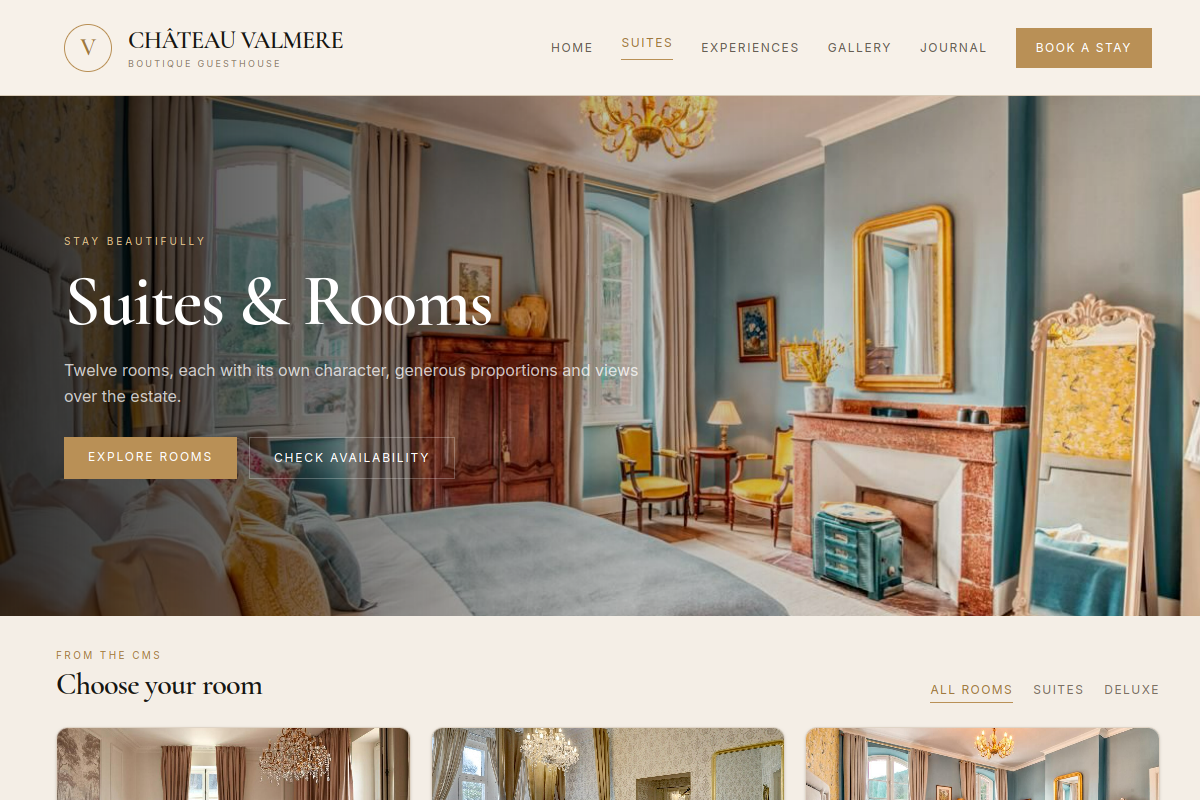
The Château Valmere example shown on our homepage follows one project through several requests. This capture shows its published Suites listing. It illustrates the output; the brief above is a separate example.

Château Valmere — page Suites du projet de démonstration
Château Valmere · published Suites page, sourced from the homepage’s MCP example.Open full size ↗