Communik.io : Site & App builder
communik.io

Managed modules

Add the service behind the page.Booking, member access and discussions.

A service page can lead to an appointment, a sign-in or a conversation. Communik’s managed modules provide those workflows alongside the site you design.

Example · Appointment journey
THE OFFERConsultation · Duration and preparation
BOOKING MODULEAvailable times · Booking · Confirmation
CLIENT FOLLOW-UPCancellation and any payment settings
The page describes the consultation; availability comes from the booking module.

Choose the module that fits the visit

Appointments and availability

For a practice or a studio, booking starts with services, durations and available times. Link the service page to the booking journey, then test confirmation, cancellation and any payment settings you enable.

Member accounts

Use the authentication module when visitors need to sign in. Decide which pages require an account and check the journey as a signed-out visitor as well as a signed-in member.

A forum for ongoing exchanges

For a community or an association, organize discussions into sections and define moderation access. Check who can read, post and manage conversations before inviting members.

Install it, then make it part of the site

Design the entry points

A module does not explain the offer for you. State the service, what visitors need to prepare and what happens after they act. Give each relevant page a clear link into the module.

Check the plan and the settings

Some modules are paid add-ons. Check the site’s offer before enabling one, then configure its actual services, access rules and notifications. A finished page and a configured module both matter to the visitor’s experience.

One visitor journey to test from start to finish

For a consultation, the page explains the service and the booking module supplies availability. After configuring it, follow the same path as a visitor: choose the service, select a slot and check the confirmation. Test the signed-out and mobile journeys as well.

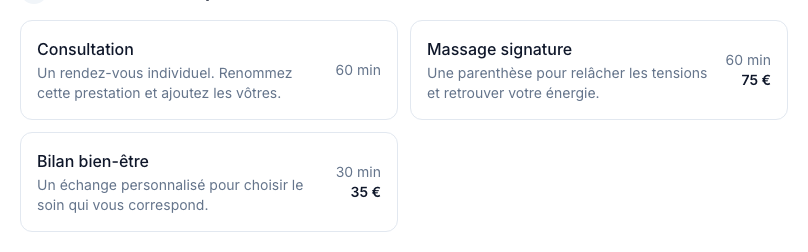
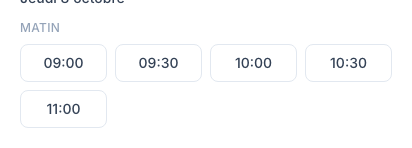
What the visitor selects

The documentation’s booking example shows the services offered and the times still available. The module supplies these choices after you configure the services and opening hours. French interface.

Communik — prestations proposées à la réservation
Choose a service in the booking module.Open full size ↗
Communik — heures disponibles pour la réservation
Then choose an available time.Open full size ↗