
Staging · Private previewStaging · Aperçu privé
Get client sign-offValidez le sitebefore you go live.avant publication.
Share a private preview with your client while visitors still see the current site.Partagez un aperçu privé avec votre client pendant que les visiteurs voient toujours le site actuel.
Publication mapCarte de publication
Simplified exampleExemple simplifié
One café website.Un site de café.
Friday closing time, in two published versions.L’heure de fermeture du vendredi, dans deux versions publiées.
Closing timeFermeture
FridayVendredi
8 pm20 h
Closing timeFermeture
FridayVendredi
6 pm18 h
8 pm20 h
Your client reviews the new hours while visitors see the current version.Le client relit le nouvel horaire. Les visiteurs voient la version actuelle.The approved hours now appear on the public site.L’horaire validé apparaît maintenant sur le site public.
Client reviewRecette client
Let your client test the whole site.Faites relire un site que le client peut tester.
Review the whole visitor journeyRelisez le parcours entier
Send the preview link and open it on a phone. For the café, check that the menu, opening hours and booking link agree. Test connected forms and bookings with appropriate test data.Envoyez le lien d’aperçu et ouvrez-le sur un téléphone. Pour le café, vérifiez que la carte, les horaires et le lien de réservation sont cohérents. Testez les formulaires et les réservations avec des données adaptées.
Keep review and live traffic separateContinuez la recette pendant que le site public tourne
Save the feedback changes, then generate staging again. The preview URL serves the latest generated version. The public site continues serving the version selected for visitors.Enregistrez les corrections, puis régénérez le staging. L’URL d’aperçu montre la dernière version générée. Le site public continue de servir la version choisie pour les visiteurs.
Control who receives the linkGardez la main sur le lien partagé
Anyone with the complete protected link can open the preview. If it has circulated too widely or the review is finished, renew its token, regenerate staging and check that the old link is refused.Toute personne qui possède le lien protégé complet peut ouvrir l’aperçu. S’il a trop circulé ou que la recette est terminée, renouvelez son jeton, régénérez le staging et vérifiez que l’ancien lien est refusé.
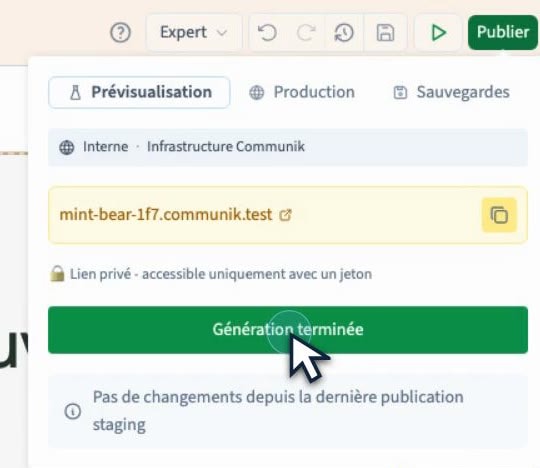

Publication controlPilotage de la publication
Choose what visitors see.Choisissez la version que voient les visiteurs.
Compare the version numbers selected for staging and production. When the client approves the preview, choose the approved version for production and confirm the switch. Open the public address to check the result.Comparez les numéros de version sélectionnés pour le staging et la production. Quand le client valide l’aperçu, choisissez la version approuvée pour la production et confirmez la bascule. Ouvrez l’adresse publique pour vérifier le résultat.
- Builder previewAperçu dans le builder
- Inspect the work you are currently editing.Contrôlez le travail en cours d’édition.
- StagingStaging
- Review a generated version at a private URL.Faites relire une version générée sur une URL privée.
- ProductionProduction
- Serve the approved release to visitors.Servez la version validée aux visiteurs.
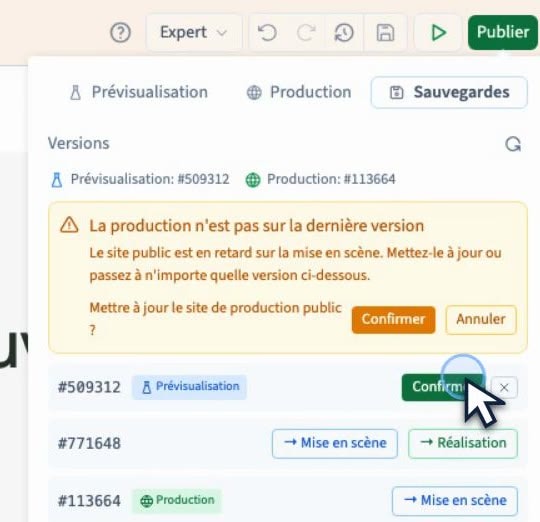
Switching a release and restoring workBasculer une version et restaurer le travail
Change the published resultChanger le résultat publié
Use the version selector to change what visitors see. An older version must still be available to be served.Utilisez le sélecteur de versions pour changer ce que voient les visiteurs. Une ancienne version doit encore être disponible pour pouvoir être servie.
Resume editing an earlier designReprendre l’édition d’un ancien design
Restore the appropriate builder backup, then publish a new staging version. Check the backup’s scope first, particularly if the project uses CMS records.Restaurez la sauvegarde appropriée dans le builder, puis publiez une nouvelle version de staging. Vérifiez d’abord la portée de la sauvegarde, notamment si le projet utilise des fiches CMS.
In the editorDans l’éditeur
From private preview to public release.De l’aperçu privé à la mise en ligne.
These short recordings show the actual publishing workflow. The interface is in French.Ces courtes captures montrent le parcours réel de publication dans l’éditeur.
Review your next site in staging.Faites la recette de votre prochain site.
Start a free project ↗Créer un projet gratuit ↗