
Choose a fallback for missing translations
1. Distinguish the visited language from the fallback
The visited version determines the language prefix. If a value is missing in that language, Communik can use a secondary fallback or the default language. An explicit translation takes priority. The fallback supplies content. The prefix still belongs to the visited language. Set a specific page path for each language when you need a stable public address.
2. Choose a fallback on the language card
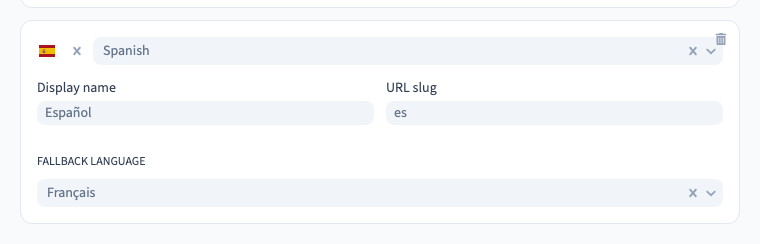
In Site > Languages & Translations > Settings, find the secondary language. Set Fallback language. In the demo, the Spanish version uses French copy where Spanish is missing. Save and note the expected result before publishing.
Could not play. Try the video controls.
3. Check the result as a visitor
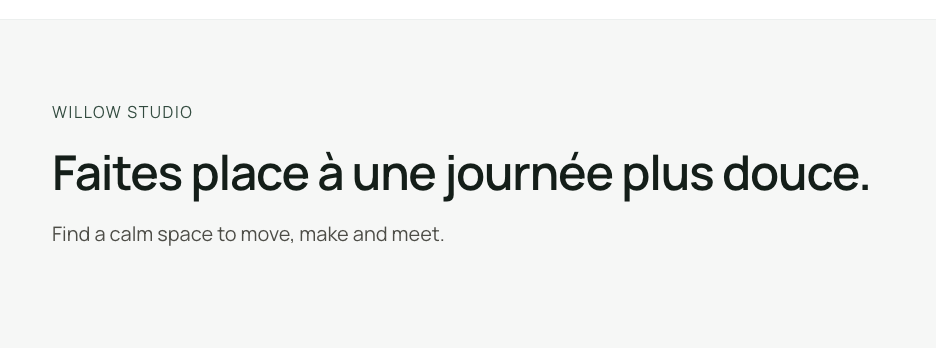
Publish privately and open the Spanish address. The example has an explicit Spanish path at /es/taller. It shows the French heading and metadata, while the document language is Spanish. Open the canonical address directly to check that it reaches the page you are testing. Compare it with English and French. Repeat the check on a narrow screen.
Could not play. Try the video controls.
4. Keep the fallback easy to maintain
Choose a clear fallback close to the content you can maintain. Chains can make it harder to predict what visitors will read. Plan for items missing throughout the chain and recheck all languages that use a fallback when you retire a version. Add explicit translations before sharing critical journeys.