
Choose between collections, imports and external sources
A Communik collection contains records managed in your site's CMS. An external source lets the site request data from another service, such as an API. These approaches can coexist; choose according to where the content should be maintained.
1. Find the data sources
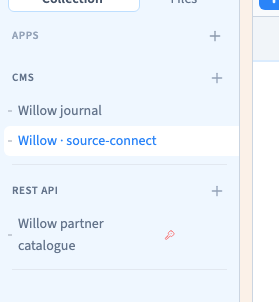
Open Data in the builder toolbar. The sidebar distinguishes your CMS collections from the external connection types available in the project.
The demonstration shows the studio journal among the site's collections and REST API as an external connection section. Available providers depend on the components installed in the project. This overview does not certify an Airtable, Notion or other third-party connection.
2. Open the connection form
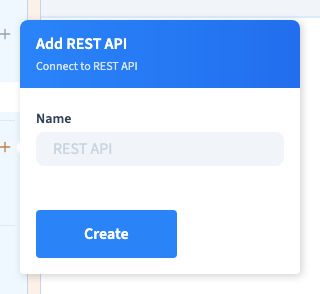
Use the + beside REST API. The form asks for a name so that editors can recognise the connection. Prefer “Partner catalogue” to “API 1”.
Creating an entry is only the start. You still need the service settings, any required credentials and its requests. A connection appearing in the sidebar does not prove it works.
The video opens this form, then closes it without creating a source or entering credentials. Existing sources and collection data remain unchanged.
Could not play. Try the video controls.
3. Choose the appropriate approach
| Your need | Approach to examine |
|---|---|
| Edit records directly in Communik | Communik collection |
| Bring an existing content file into the CMS | Import into a collection |
| Keep maintaining the content in another service | External connection |
An import adds records to the CMS. An external connection requests data from the configured service; it does not automatically turn the response into Communik collection records.
4. Prepare the service information
Identify the service, authorised access and fields the website should display. For an API, obtain its request address and an example response from the provider.
Start with a simple title and description. Check the response before building a complex page around it, then connect the returned fields to the intended page elements.
5. Verify the real limits
Reading and writing are separate capabilities. Displaying a response does not prove that writing back to the remote service is configured or allowed.
Prepare for empty responses, refused access and unavailable services. The update rhythm depends on the request, provider and configuration; a connection is not a guarantee of immediate synchronisation in both directions.
For agencies: scope of this overviewThis article locates the connection controls and distinguishes external sources from collections and imports. It does not validate external authentication, quotas, REST or GraphQL transport, or write operations. Each requires an appropriate configuration and its own verification.