
Paginate a content list
Pagination gives visitors access to the next records without presenting the whole collection on one page.
1. Prepare the connected list
Connect the repeated element to a collection and choose the number of records per page. The Willow journal contains three entries and shows two at a time. Use a stable sort so the entries keep a predictable order.
2. Connect numbered pages
In Designer expert > Layers, select the pagination element. Under List, choose the repeating card element, then choose Add link + Page parameter in URL. This prepares the pagination destination and the page parameter in the address.
Save and check the published page. Page 1 shows the first two entries; link 2 opens Waterside pause. Reload that second address to check that its page number persists, then use link 1 to return.
Expert mode exposes visual controls here; you do not need to write code.
Could not play. Try the video controls.
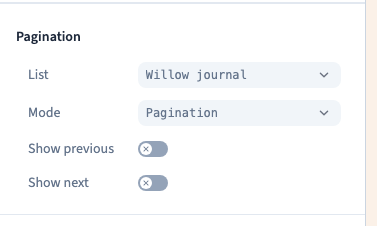
3. Choose a progressive mode
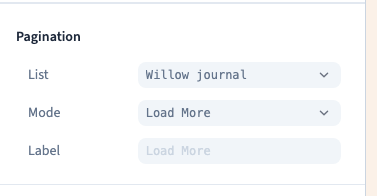
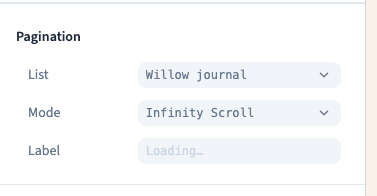
Choose the appropriate Mode in the same panel.
| Mode | Visitor action | Result |
|---|---|---|
| Pagination | Choose a page number | Show that page's records |
| Load More | Click the loading button | Append the next records |
| Infinity Scroll | Move towards the end of the list | Automatically append the next records |
Load More lets visitors decide when to continue. Existing records stay visible; at the end, the control must no longer load further results.
Infinity Scroll removes the repeated click. Consider access to the footer and links after a long list. Numbered pages offer separate reloadable addresses; progressive modes navigate within the current list.
4. Test the complete sequence
Check the first page, next page, return and direct reload. For progressive modes, confirm that previous entries remain, each new record appears once and loading stops at the end.
The journal's two progressive modes should retain Calm morning and Forest walk, then add Waterside pause once. This example does not certify every combination of filters or external providers.
Test the published website at phone width. This checks the visitor's site, not the builder's suitability for editing on a phone.
If records are missing, inspect the list connection, limit, sorting and filters separately. The pagination must target the intended repeating element. Numbered mode also needs its page parameter and a published configuration.