
Prepare CSV, JSON, XML and other import files
A file format describes how values are organised. Choose the simplest format your source can produce. The import wizard still needs field matching and value validation, whichever format you use.
1. Prepare a CSV or TSV
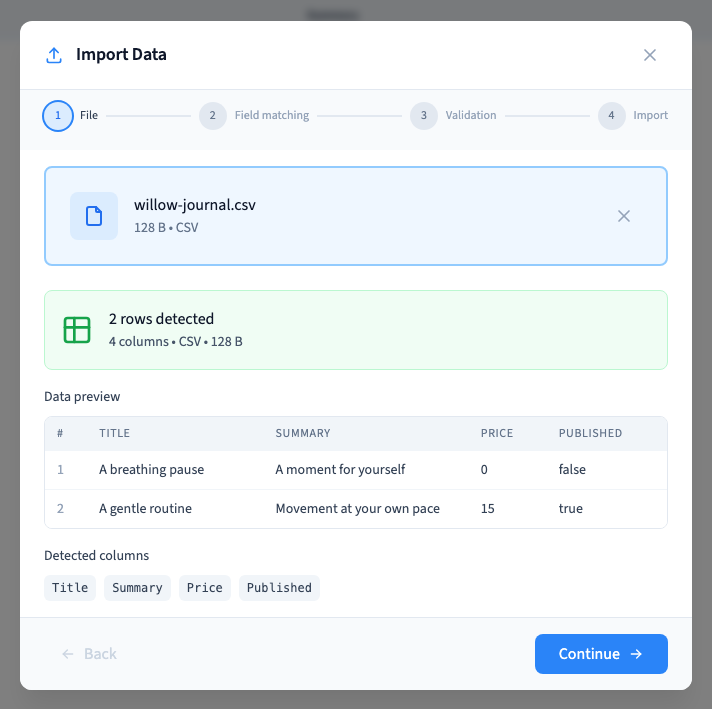
Put column names on the first row and records on the following rows. In CSV, quote text that contains the separator, quotes or a line break. A TSV uses tabs between columns.
Save as UTF-8 to preserve accents. Remove decorative title rows, merged cells and spreadsheet formulas whose exported values are unclear. The example verifies the same two records and four fields in CSV and TSV, including zero and false.
Could not play. Try the video controls.
2. Prepare JSON
An explicit array of objects is the clearest structure: one object per record and one key per column.
[
  {"Title":"A breathing pause","Price":0,"Published":false},
  {"Title":"A gentle routine","Price":15,"Published":true}
]
Keep the objects consistent. Valid JSON does not guarantee that the values fit your collection. Matching and validation remain necessary. Some wrappers around an array are recognised, but a direct array avoids ambiguity.
3. Prepare XML
Use a repeated structure for the records, for example a root element containing several row elements with the same field names.
<rows>
  <row><Title>A breathing pause</Title><Price>0</Price></row>
  <row><Title>A gentle routine</Title><Price>15</Price></row>
</rows>
The verification recognises two row elements and their field matching. Attributes and deeply nested structures are not substitutes for a regular record list. Simplify the file when the preview does not represent the intended records.
4. Understand SQL imports
For agencies: import INSERT dataThe reader recognises INSERT INTO statements with column names and value groups. It extracts their data; it does not run an unrestricted SQL script or restore an entire database.
A file containing only CREATE TABLE statements provides no records to import. Simplify a technical export and check the detected rows. The verification recognises one INSERT statement containing two value groups.
5. Check limits and references
The file size limit is 50 MB and one import accepts at most 10,000 rows. The preview shows the first 100 rows; it is not the complete file.
An image value is a media reference and a relation points to another record. A column containing filenames or people's names does not upload their files or automatically construct their relationships.
The accompanying recording demonstrates CSV. Additional real wizard checks verify CSV, TSV, JSON, XML and SQL through validation without importing another copy of the example records. For a larger migration, test references, static fields, translations and duplicates on a representative sample.