Set up and read an A/B test
1. Prepare a single change to compare
Create a block variant that changes one thing, such as its headline. Pick the action you want visitors to complete and the resulting goal page. Give the variant a recognisable name.
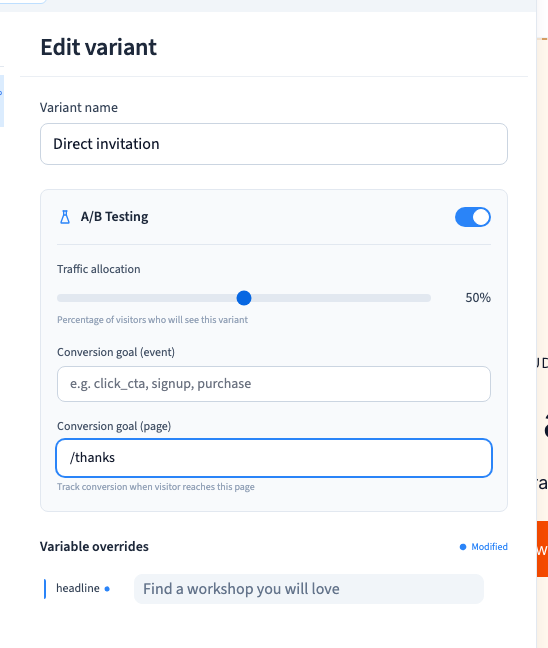
2. Set the traffic split and goal page
Open the block’s context controls and choose Variants. Edit the variant and enable the A/B test. Choose the share of traffic and enter the goal page path. The example allocates half to the variant and uses the default for the rest.
Could not play. Try the video controls.
3. Test both versions after generating the site
Publish privately. Open several fresh visitor sessions and compare the variants they receive. Reload a session to check that it stays on its assigned version. Follow the goal link and confirm the resulting page.
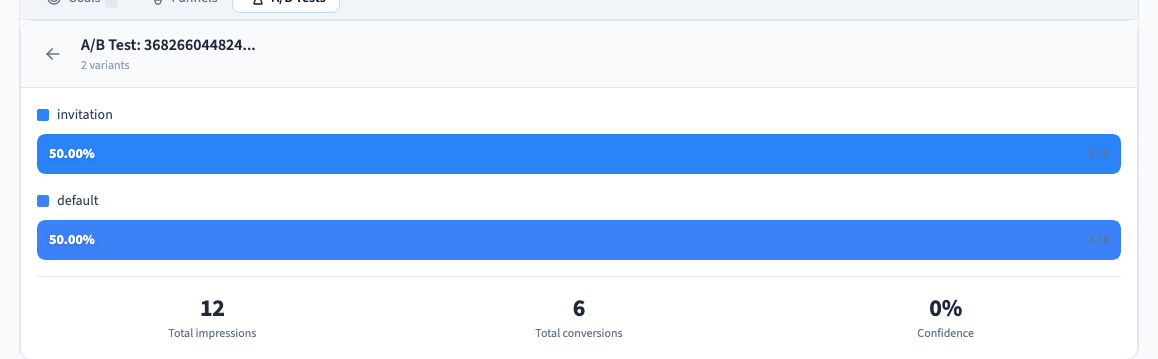
4. Read the A/B results
Open Site > Analytics > A/B Tests. Select the test and compare exposures, conversions and the sample size for each variant. Review the dates and goals before interpreting changes. A few differences in a small sample are a reason to collect more evidence.
Could not play. Try the video controls.