Compare and apply a predefined theme style
A predefined style offers coordinated colours, fonts and common component styles. It changes the selected theme's appearance, rather than replacing page content.
1. Browse the proposals
In Design, open Theme, check the selected theme and choose Predefined styles. The panel shows the current theme and proposed styles, with examples of colours, headings and components.
Scroll the panel to compare proposals while keeping your real page visible beside it.
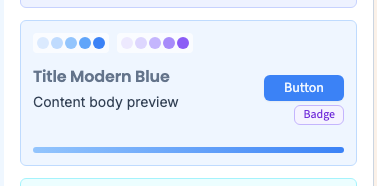
2. Apply a card
Click a style card to apply its settings immediately. There is no extra Apply button in this panel.
The recording chooses Modern Blue, verifies that the common palette and heading family change, and checks that the heading's words and local settings remain.
A card previews its proposal; it does not guarantee that your entire page will match it exactly.
Could not play. Try the video controls.

3. Understand unchanged elements
A text or button can have local font, colour or corner settings. Those can retain priority over common choices. A preset does not remove page content or automatically erase local exceptions.
Inspect multiple pages, links, cards and narrow widths. Recheck contrast against your actual images and backgrounds.
4. Recover the preceding theme
Use Undo if the proposal does not suit the site. The demonstration checks that the previous palette and font return.
The Current card reflects the present state; it is not a permanent backup of the preceding version. Undo an unwanted proposal before comparing the next one.
After choosing a base, refine the palette and common fonts. Save and inspect staging before production: editing the theme does not publish the public site by itself.