
Create a website for your holiday let management business
- 5Create your site
- 6Go live
Steps 5 and 6 happen after you create your account: the site is generated with your answers, then you publish it on your own domain when you are ready.
What your website doesfor you.
Four things that turn a visitor into a customer, in place from the first day.
New owners from your own area
Listing and photos, pricing, guest messages, check-ins and keys, cleaning and linen: each service has its own page, found by owners in the towns you cover. The site is built in an evening, without an agency.
See your site before you sign up
Pick a design, type your business name and phone number, and the preview on this page updates as you go. You only create an account if you like what you see.
An estimate request that brings in owners
The form asks for the address of the property, its type and size, and when it is free to let. The homes you manage are on show as a portfolio, with no online booking or payment. Your number calls in one tap.
Your commission and the rules, in writing
One section sets out your commission, what it covers, what guests pay and what is charged at cost. Another explains the paperwork you handle with the owner: declaration and registration number, and the 120-day cap on a main residence, which the town can lower to 90.
The pages you get
Not an empty template to fill in: pages already written and already linked to each other, with example content you correct instead of writing from scratch.
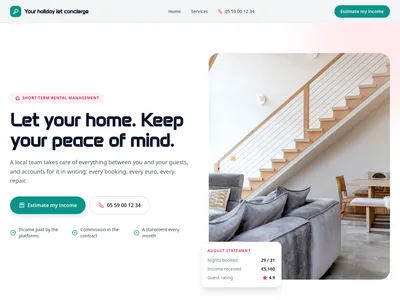
/Holiday let management, from the listing to the keys
Home page: the promise, services and how they are paid, how we take on a home, homes we manage, the rules, towns covered, owner reviews and the income estimate form
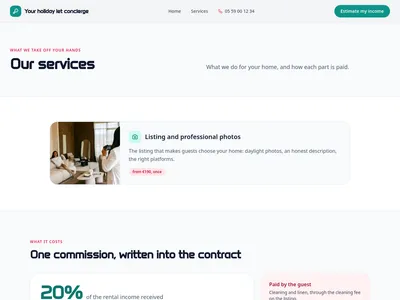
/servicesOur concierge services and how each is paid
Every service, with photo and how it is paid, then the commission and the estimate form
![Preview of the /services/[slug] page](https://static.communik.io/modules/screenshots/concierge-t0-p2-010b96c8-t400.webp?v=1790293880678)
/services/[slug], holiday let concierge
One page per service: what it covers, what to know, how it is paid, and the estimate form
What is added to your project
Ready-to-use databases. Edit one row and every page that shows it updates.
Services
8 columns · 7 rowsTitle, Slug, Short description, Description, Icon, How it is paid, Photo, Order
Homes
10 columns · 6 rowsTitle, Slug, Short description, Type, Surface, Bedrooms, Town, Neighbourhood, Photo, Order
Areas
4 columns · 8 rowsTown, Slug, Postcode, Time to reach a guest
Before you start.Everything else, just ask.
What people ask before they get going.
Is the site written for owners or for guests?
For owners: the visitor is the person deciding whether to hand you their keys. Guests still find your 24/7 line on every page.
What does the site say about the rules for short-term lets?
Only what the law of 19 November 2024 sets: every furnished holiday let must be declared and registered, and a main residence can be let for up to 120 days a year, a cap the town can lower to 90. The rest depends on the town and is presented as help you give, never as a rule.
Can I show the homes I manage?
Yes, as a portfolio with photos. There is no booking engine and no payment: guests keep booking on the platforms you already use.
How much does it cost?
Building it is free; publishing on your domain starts at €14/month, hosting and SSL included.
Is the website mine?
Yes. Your text, your photos and your domain name stay yours, and the subscription is monthly: you can cancel whenever you like.
Another trade?
Each one comes with its own live demo site you can browse before you start: same editor, same price, content already written for that job.