
Create a website for your landscaping business
- 5Create your site
- 6Go live
Steps 5 and 6 happen after you create your account: the site is generated with your answers, then you publish it on your own domain when you are ready.
What your website doesfor you.
Four things that turn a visitor into a customer, in place from the first day.
Quote requests from your own area
Year-round garden upkeep, garden design, tree pruning, timber decks: each service has its own page, found by homeowners and managing agents in the towns you cover. The site is built in an evening, without an agency.
See your site before you sign up
Pick a design, type your business name and phone number, and the preview on this page updates as you go. You only create an account if you like what you see.
Your gardens and your prices on show
Finished gardens with the town, the materials and the plants; services with a starting price and a typical duration; your customer reviews; and a phone number that calls in one tap on mobile.
Your rounds and the tax credit, explained
Each town you cover shows its maintenance round day. If you are registered as a personal services provider, a section explains the 50% tax credit on garden upkeep: what qualifies, what does not, and the annual cap.
The pages you get
Not an empty template to fill in: pages already written and already linked to each other, with example content you correct instead of writing from scratch.
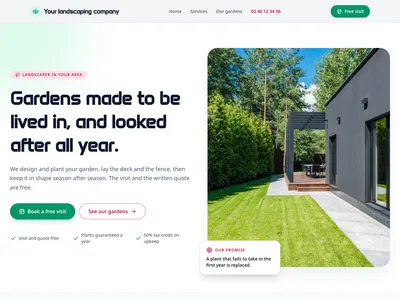
/Landscaper: garden design, upkeep and tree care in your area
Home page: finished gardens, services with prices, the tax credit on upkeep, how a job goes, towns covered, reviews and quote form
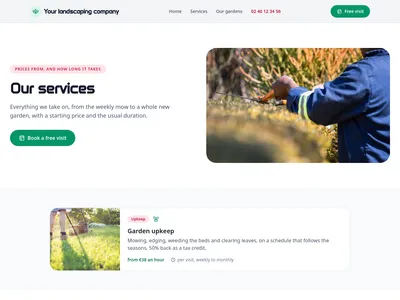
/servicesOur landscaping services and starting prices
Every service with photo, family, starting price and duration, then finished gardens and the quote form
![Preview of the /services/[slug] page](https://static.communik.io/modules/screenshots/landscaper-t0-p2-6339ed94-t400.webp?v=1790283636137)
/services/[slug], landscaping services
One page per service: what it covers, what to know, how long it takes, what it costs, and the quote form
What is added to your project
Ready-to-use databases. Edit one row and every page that shows it updates.
Services
10 columns · 7 rowsTitle, Slug, Short description, Description, Icon, Family, Starting price, Typical duration, Photo, Order
Projects
9 columns · 6 rowsTitle, Slug, Short description, Plants and materials, Duration, Town, Photo, Year, Order
Service areas
4 columns · 9 rowsTown, Slug, Postcode, Maintenance round
Before you start.Everything else, just ask.
What people ask before they get going.
Can my customers claim the 50% tax credit?
If your business is registered as a personal services provider (services à la personne), yes, for light gardening: routine upkeep, hedge trimming and clearing, up to €5,000 of spending a year. Garden design, tree surgery and groundwork do not qualify. The site explains it for you, and the section is removed if you are not registered.
I also work for residential blocks. Does the site speak to them?
Yes. The pages address homeowners as well as managing agents and residents' committees looking after shared grounds, with a sample project and review that you replace with your own.
How do customers ask for a quote?
A form on the home page and on every service page asks for the garden address, its rough size and the project. You call back to arrange a visit.
How much does it cost?
Building it is free; publishing on your domain starts at €14/month, hosting and SSL included.
Is the website mine?
Yes. Your text, your photos and your domain name stay yours, and the subscription is monthly: you can cancel whenever you like.
Another trade?
Each one comes with its own live demo site you can browse before you start: same editor, same price, content already written for that job.