
Create a website for your masonry business
- 5Create your site
- 6Go live
Steps 5 and 6 happen after you create your account: the site is generated with your answers, then you publish it on your own domain when you are ready.
What your website doesfor you.
Four things that turn a visitor into a customer, in place from the first day.
Quote requests for the work you want
Extensions, load-bearing wall openings, slabs, boundary walls, facades: each service has its own page, found by homeowners in the towns you cover. The site is built in an evening, without an agency.
See your site before you sign up
Pick a design, type your business name and phone number, and the preview on this page updates as you go. You only create an account if you like what you see.
Your finished jobs and your guarantees
Past projects with the town, the material and the duration; your ten-year insurance, one-year completion guarantee and handover explained; your customer reviews; and a phone number that calls in one tap.
The paperwork, set out on every job
Each service shows its starting price, its duration and when you can start, and what the homeowner has to do: planning declaration or permit for an extension, co-owners' vote for a load-bearing wall, the VAT rate that applies.
The pages you get
Not an empty template to fill in: pages already written and already linked to each other, with example content you correct instead of writing from scratch.
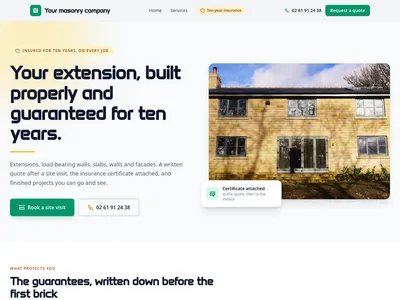
/Mason near you: house extensions, load-bearing walls, slabs and walls, free quote
Home page: guarantees, services with starting prices, how a job runs, past projects, areas covered, reviews and the site quote form
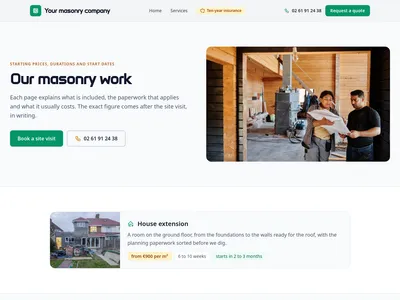
/servicesOur masonry work: extensions, load-bearing walls, slabs, walls and facades
Every service, with photo, starting price, duration, start date and the guarantees that come with it
![Preview of the /services/[slug] page](https://static.communik.io/modules/screenshots/mason-t0-p2-6e9f24f0-t400.webp?v=1790290492745)
/services/[slug], masonry work
One page per service: what it covers, the paperwork, how long it takes, what it costs, and the quote form
What is added to your project
Ready-to-use databases. Edit one row and every page that shows it updates.
Services
10 columns · 6 rowsTitle, Slug, Short description, Description, Icon, Starting price, Typical duration, Typical lead time, Photo, Order
Past projects
9 columns · 6 rowsTitle, Slug, Short description, Material, Site duration, Town, Photo, Year, Order
Service areas
4 columns · 8 rowsTown, Slug, Postcode, Site visit within
Before you start.Everything else, just ask.
What people ask before they get going.
Does the site explain planning rules for an extension?
Yes. The extension page says when a planning declaration is enough and when a building permit is needed (beyond 20 m² created, 40 m² in the urban zone of a local plan), and when an architect becomes compulsory. These rules were checked against the official texts.
Is my ten-year insurance shown?
Yes: the guarantees section explains the ten-year guarantee, the one-year completion guarantee and the handover, says that your insurance certificate comes with every quote, and reminds homeowners of the building damage insurance they take out themselves.
What does the quote form ask for?
The site address, the kind of work, rough dimensions and when the customer would like it done. It sits on the home page, the services list and every service page.
How much does it cost?
Building it is free; publishing on your domain starts at €14/month, hosting and SSL included.
Is the website mine?
Yes. Your text, your photos and your domain name stay yours, and the subscription is monthly: you can cancel whenever you like.
Another trade?
Each one comes with its own live demo site you can browse before you start: same editor, same price, content already written for that job.